
How to reset solar inverter
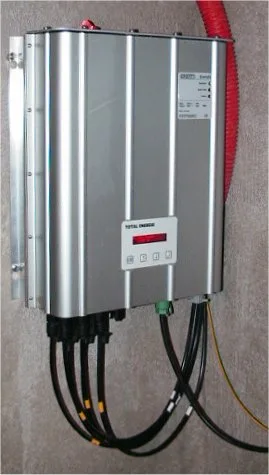
Short answer: To reset a solar inverter, switch off the AC disconnect first, then the DC disconnect, wait a full five minutes, and power back on in reverse order — DC first, then AC. Powering on out of sequence can re-trigger the fault you are trying to clear. If the same fault code returns after a reset, stop resetting and call your installer.
A solar inverter that suddenly stops working often just needs a reset, not a repair. Knowing the correct reset procedure — and when NOT to reset — saves an unnecessary service call.
Table of Contents
- Basic Reset Procedure
- Reset Methods by Situation
- When NOT to Reset
- After the Reset: What to Check
- Frequently Asked Questions
Basic Reset Procedure
Most solar inverters reset the same basic way: turn off the AC disconnect first, then the DC disconnect, wait a full 5 minutes, then power back on in reverse order — DC first, then AC. This sequence matters. Powering back on out of order can trigger the same fault the reset was meant to clear.
Reset Methods by Situation
| Situation | Recommended Action |
|---|---|
| Fault code, system otherwise fine | Standard AC/DC disconnect reset |
| Frozen or unresponsive display | Power cycle via disconnects, same as above |
| App shows offline, inverter running fine | Reset the Wi-Fi/communication module only, not the whole inverter |
| Repeated same fault after reset | Stop resetting — call a professional |
When NOT to Reset
Don’t reset repeatedly if the same fault keeps returning immediately after each attempt. That pattern points to a real hardware or wiring issue that a reset can’t fix, and repeated resets can occasionally make diagnosis harder for a technician. Also avoid resetting during active troubleshooting with a technician on the phone — they may need to see the current fault state.
After the Reset: What to Check
Once power is restored, confirm the inverter’s display or app shows normal operation, not just “on.” Check that production resumes at a level consistent with current sunlight conditions. If the fault code returns within minutes or hours, document the exact code and contact your installer rather than repeating the reset again.
Frequently Asked Questions
How long should I wait between turning off and back on?
A full 5 minutes is the standard recommendation, giving internal capacitors time to fully discharge.
Is it safe to reset my inverter myself?
Yes, the AC/DC disconnect switches are designed for homeowner use — just follow the correct order.
Will resetting my inverter erase my production history?
No, production history is typically stored in the cloud or on a separate monitoring device, not lost on reset.
What if my inverter won’t turn back on after a reset?
Stop and contact your installer or manufacturer — this points to a real fault, not something a homeowner reset can resolve.
Can I reset my inverter during a power outage?
There’s no benefit — a grid-tie inverter won’t produce power during an outage regardless of reset state.
For ongoing care beyond resets, see our solar inverter maintenance guide. For deeper fault diagnosis, see our troubleshooting guide.
Related Posts

Leave a Comment
Your comment will be published after it has been approved. Please send comments that do not contain slang words.