
Solar Inverter Troubleshooting Guide
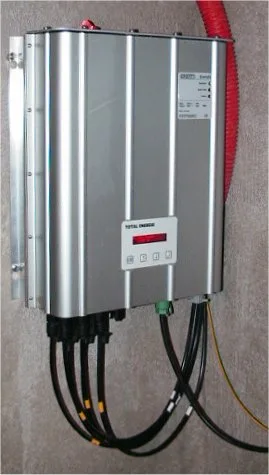
Short answer: Troubleshooting a solar inverter follows one approach across brands: read the specific fault code on the display or app first, identify which fault category it belongs to, then decide whether it is a safe external check or reset you can do yourself or a fault that needs a licensed technician. Never open the enclosure — inverters carry high voltage internally and internal service is technician-only.
This solar inverter troubleshooting guide covers the general diagnostic approach that applies across brands – checking the display or app for a specific fault code before doing anything else, understanding the main fault categories, and knowing which issues are safe to check yourself versus which need a licensed technician.
Safety note: inverters carry high voltages internally. This guide covers checking displays, app diagnostics, and safe external resets only – never open the inverter enclosure. Internal service is technician-only work.
Table of Contents
- What should I check first when my solar inverter has a problem?
- What are the most common solar inverter fault categories?
- Why is my solar inverter producing no power with no error code?
- Why is my solar inverter output lower than expected?
- Why does my solar inverter show offline but still produce power?
- When should I call a solar technician?
- Where can I find troubleshooting help for my inverter brand?
- How do I diagnose a solar inverter problem step by step?
- How do seasons affect solar inverter performance?
- Tools for Remote Diagnosis
- How often should I perform solar inverter maintenance?
- What should I document for a solar inverter warranty claim?
- What are common solar inverter troubleshooting mistakes?
- Frequently Asked Questions
What should I check first when my solar inverter has a problem?
Before troubleshooting any inverter issue, gather a few things. Record the exact fault code or error message shown on the display or app. Note when it started, and whether it is constant or intermittent. Note recent weather conditions, since storms and extreme heat or cold can trigger certain faults. And note whether anything changed recently, such as a firmware update, a nearby construction project, or a utility outage. Having this ready before contacting an installer or manufacturer support considerably speeds up diagnosis compared to a vague “it stopped working” description.
What are the most common solar inverter fault categories?
| Category | Typical Cause | Urgency |
|---|---|---|
| Grid-related fault | Utility grid voltage/frequency outside acceptable range – often not the inverter’s fault | Low, usually self-clears; escalate only if frequent |
| DC/string fault | Wiring, connector, or panel/string issue on the solar side | Medium – worth an installer visit if persistent |
| Internal/hardware fault | Internal component issue | High – technician-only, don’t attempt DIY fixes |
| Communication/monitoring fault | Networking issue, not a production issue | Low – verify actual production separately before escalating |
Why is my solar inverter producing no power with no error code?
An inverter showing no fault code but also no production is most commonly hitting a startup threshold. Insufficient sunlight is the usual cause, common in early morning, late evening, or heavy overcast. This is normal operation, not a problem. If it persists during clearly adequate daylight, check the physical DC and AC disconnect switches. Both should be in the on position. They are sometimes switched off during unrelated electrical work and never switched back on.
Why is my solar inverter output lower than expected?
Gradual output decline with no fault code is more often a maintenance issue than an inverter problem. Panel soiling is one cause. Developing shade from growing trees or new nearby construction is another. A single underperforming panel can also drag down its string in series-wired configurations. Compare current output to the same calendar period in a prior year (accounting for weather) rather than a flat expectation, since seasonal variation is normal.
Why does my solar inverter show offline but still produce power?
A very common false alarm: the monitoring app shows the inverter as offline while the system is actually producing power normally. This is almost always a networking issue (wifi dropout, router reboot, monitoring card losing connection) rather than an inverter fault. Check actual production – the physical display, or your home’s real energy usage/export – before assuming a fault. A connectivity issue with normal production underneath is not urgent and usually resolves with a router or monitoring-device power cycle.
When should I call a solar technician?
- Any internal/hardware fault code.
- A fault that recurs immediately after a safe external reset.
- Visible physical damage, unusual smell, or unusual noise.
- Persistent DC-side faults after confirming no obvious external wiring issue.
- Any fault you’re not confident interpreting – attempting unauthorized internal access risks voiding warranty coverage.
Where can I find troubleshooting help for my inverter brand?
General troubleshooting principles apply across brands, but exact fault code meanings differ by manufacturer. See our Fronius inverter troubleshooting guide for that brand’s specific state-code categories, and check your specific manufacturer’s official documentation for other brands – always cross-reference the exact code against official sources rather than a general guide like this one for the precise meaning.
How do I diagnose a solar inverter problem step by step?
- Is there an active fault code on the display or app? If yes, note it exactly and check against your manufacturer’s documentation or a brand-specific guide.
- If no fault code, is the system actually producing power? Check your home’s real usage/export, not just the app – if production is normal, this is a monitoring/connectivity issue, not a system fault.
- If no production and no fault, is it daylight with adequate sun? Confirm disconnect switches are on, and rule out a simple startup-threshold non-issue before assuming a fault.
- If production is happening but noticeably lower than expected, check for new shading, soiling, or compare against the same period last year before assuming an equipment problem.
- If none of the above resolves it, gather the information from step one above and contact your installer or manufacturer support.
How do seasons affect solar inverter performance?
| Season | Common Issue |
|---|---|
| Winter | Reduced output from shorter days and lower sun angle is normal, not a fault; snow cover on panels temporarily blocks production |
| Spring | Pollen and debris buildup can gradually reduce output – a good time for a panel inspection/cleaning |
| Summer | High heat can slightly reduce panel efficiency (normal temperature coefficient effect) and may trigger inverter thermal throttling in extreme conditions |
| Fall/storm season | Grid-related faults may increase with storm-related utility power quality events; falling leaves can create new shading patterns |
What tools can diagnose solar inverter issues remotely?
Most current-generation inverters include a monitoring app or web portal showing historical production data. That is genuinely useful for diagnosing intermittent issues not actively showing a fault when you check. A recurring dip at a consistent time of day often points to developing shade. A sudden step-change in typical output can indicate a failed string or panel. And comparing year-over-year data for the same calendar period helps separate a real problem from normal seasonal variation. Pulling up several weeks of historical data before contacting support – rather than describing “it seems lower than usual” – gives a technician considerably more to work with.
How often should I perform solar inverter maintenance?
Most residential inverters need relatively little routine maintenance. A light schedule still catches issues before they become fault codes. Do a quick visual check of the display and any visible connections every few months. Keep cooling vents clear of dust and debris. Review production data against the prior year annually. And check that monitoring alerts actually reach you, by confirming you receive a notification rather than assuming the system is configured correctly. This is a much smaller time investment than dealing with a fault that went unnoticed for weeks.
What should I document for a solar inverter warranty claim?
If a fault turns into a warranty claim, having documentation ready speeds the process considerably. Have the exact fault code and when it started. Have your inverter’s model and serial number, from the nameplate or app. Have your original installation date and installer contact information. And note any troubleshooting steps you have already taken, such as a safe external reset. Warranty claims generally require diagnosis by a qualified technician rather than a DIY assessment. Unauthorized internal access can void coverage. That is the practical reason to route anything beyond a safe external check through a professional.
What are common solar inverter troubleshooting mistakes?
- Opening the inverter enclosure to inspect internally – a safety risk and typically voids warranty; leave internal access to a technician.
- Assuming every grid-related fault is the inverter’s fault – many reflect the utility grid, not the equipment.
- Confusing a monitoring app outage with an actual production stoppage – verify actual production separately.
- Not recording the exact fault code before calling support – slows diagnosis considerably.
- Overlooking a simple disconnect switch left in the “off” position – check this before assuming a complex fault.
Frequently Asked Questions
Is it safe to reset my inverter myself?
A safe external reset via the AC/DC disconnect switches is generally fine for many faults, but confirm with your installer or manufacturer documentation for your specific model first – never open the enclosure itself.
Why does my inverter show as offline but my lights are still on?
Almost always a networking/monitoring connectivity issue, not an actual production stoppage – check your physical display or real energy usage to confirm production before assuming a fault.
How often do inverters typically need service?
Well-maintained units often run years without a service call beyond routine maintenance, though component-level faults become more likely as a unit approaches or passes the 10-15 year mark.
Does a grid-related fault mean my utility has a problem?
Sometimes – an occasional brief grid fault is normal. Frequent recurring faults at consistent times may indicate a genuine local grid-quality issue worth reporting to your utility.
Where do I find the exact meaning of my specific inverter’s fault code?
Your manufacturer’s official documentation and your original installer are the most reliable sources – general troubleshooting guides (including this one) cover common categories, not every brand’s exact code list.
Does winter weather mean something is wrong with my inverter?
Not necessarily – reduced winter output from shorter days and lower sun angle is normal. Snow cover temporarily blocking panels is also common and not a fault.
How can I tell if a production dip is seasonal or an actual problem?
Compare against the same calendar period in a prior year using your monitoring app’s historical data – a dip that matches last year’s pattern is likely seasonal, not a fault.
Conclusion
Most solar inverter issues fall into a handful of general categories. Grid-related faults are often not the inverter’s fault at all. DC and string issues form a second group. Internal faults are technician-only. Communication and monitoring issues are a fourth, and are not a production problem. Correctly categorizing which one you are seeing saves real time before calling for support. See our Fronius-specific troubleshooting guide and commercial solar inverters guide for related depth.
Further reading: U.S. Department of Energy – Solar Integration: Inverters and Grid Services Basics and Wikipedia – Solar inverter.
If a fault turns out to be a hardware failure, our inverter warranty guide covers what is actually covered, and why labor usually is not.
There is more detail on this in our solar inverter noise problem guide.
If output has fallen rather than stopped, start with diagnosing an underperforming system.
Related Posts
Leave a Comment
Your comment will be published after it has been approved. Please send comments that do not contain slang words.